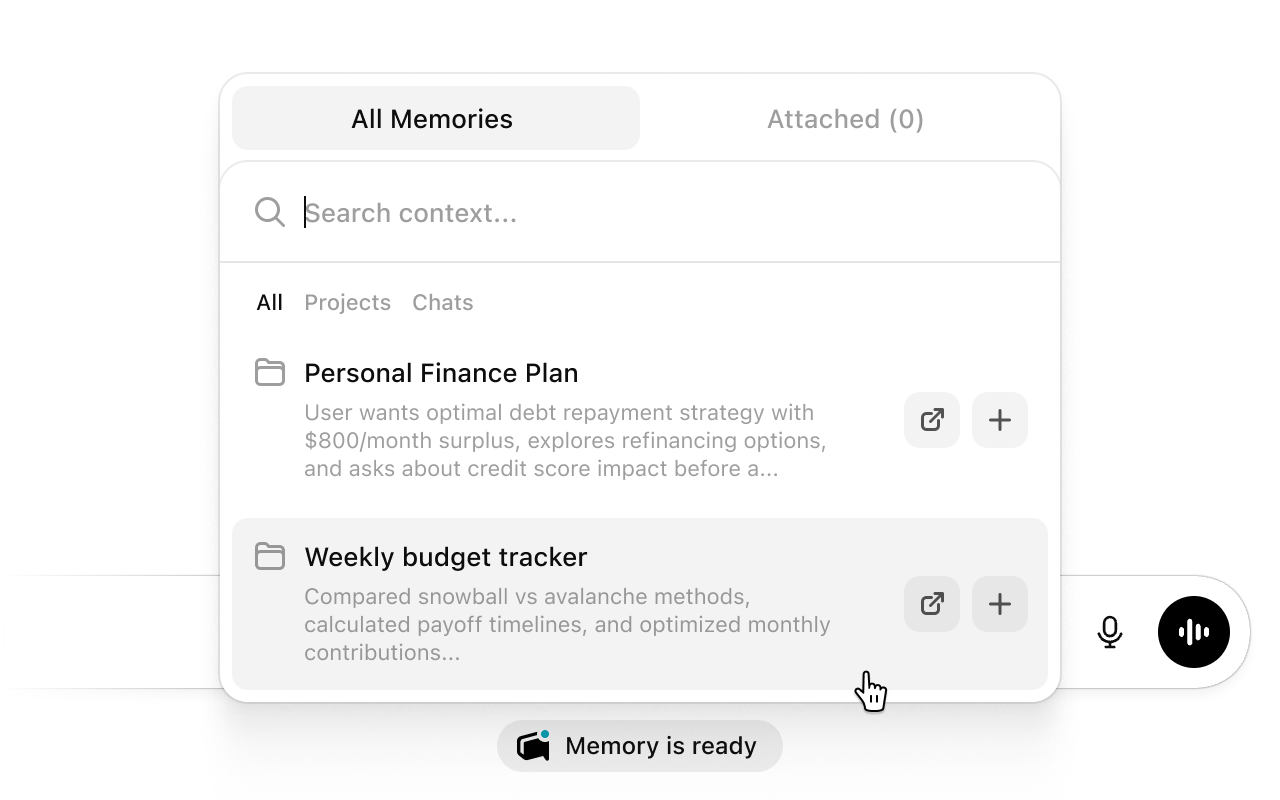
Chat like you normally would. You’ll see a MemoryBase tag below your chat box. When relevant memories are found, an indicator will appear showing that context has been attached to your message.Click the tag to preview what’s attached, or to manually add specific memories yourself.The attached context is sent with your message automatically — the AI will have knowledge from your past conversations without you having to repeat anything.
For tools like Claude Code, Codex, or AI agents, MemoryBase connects through the CLI. Follow the setup guide for Claude Code & Codex or AI Agents.Once connected, these tools can search your memory and pull in relevant context on their own.
{"docsConfig":{"theme":"mint","$schema":"https://mintlify.com/docs.json","name":"MemoryBase","colors":{"primary":"#71717a","light":"#ffffff","dark":"#27272a"},"logo":{"light":"https://mintcdn.com/memorybase/JVehneJVhIR9fRqU/public/icon-light.svg?fit=max\u0026auto=format\u0026n=JVehneJVhIR9fRqU\u0026q=85\u0026s=c02ab91494e36eac3141d86e3ad647f1","dark":"https://mintcdn.com/memorybase/JVehneJVhIR9fRqU/public/icon-dark.svg?fit=max\u0026auto=format\u0026n=JVehneJVhIR9fRqU\u0026q=85\u0026s=14431603af94375812aa02a392aca5e9"},"favicon":"https://mintcdn.com/memorybase/JVehneJVhIR9fRqU/public/favicon.ico?fit=max\u0026auto=format\u0026n=JVehneJVhIR9fRqU\u0026q=85\u0026s=f3d5ece218eafd4caeaadeb63ed45085","background":{"decoration":"grid","color":{"light":"#ffffff","dark":"#131419"}},"navbar":{"primary":{"type":"button","label":"Sign in","href":"https://dashboard.memorybase.app/sign-in"}},"footer":{"socials":{"discord":"https://discord.gg/6CnJ72D8Va"}},"styling":{"latex":false},"navigation":{"pages":[]}},"deployment":{"deploymentMetadataValue":{"subdomain":"memorybase","hasAudioNarration":false,"actualSubdomain":"memorybase","customDomains":["docs.memorybase.app"],"gitSource":{"type":"github","owner":"blessnetwork","repo":"memorybase","deployBranch":"main","contentDirectory":"packages/docs","isPrivate":true,"mountPath":"","label":""},"chroma":{"liveDeploymentHistoryId":"6a20d96ef4b627cddd2b8c82","collectionId":"404be24f-96ff-4146-91ec-a411676b6271","schemaVersion":"v2"},"entitlements":{"AI_CHAT":{"status":"DISABLED"}},"buildId":"6a20d96ef4b627cddd2b8c82:success","clientVersion":"0.0.3990","searchFilterCounts":[{"language":"default","tag":"Documentation","count":12},{"language":"default","tag":"MemoryBase CLI","count":11},{"language":"default","tag":"MemoryBase MCP","count":10},{"language":"default","tag":"Tools","count":9},{"language":"default","tag":"Commands","count":6},{"language":"default","tag":"AI Agents","count":3},{"language":"default","tag":"Getting Started","count":3},{"language":"default","tag":"Authentication","count":3},{"language":"default","tag":"Claude Code \u0026 Codex","count":3},{"language":"default","tag":"Features","count":3}]},"assistantConfig":{"enableAskAiButton":false,"enableStarterQuestions":false,"enableContextualStarterQuestions":false,"enableAskAiSearchBar":true},"basePath":"","hasChatPermissions":false,"hasWebMcpPermissions":false,"toggles":[{"name":"kill-isr","enabled":true,"variant":{"name":"disabled","enabled":false,"feature_enabled":true},"impressionData":false},{"name":"agent-mintlify-slack","enabled":true,"variant":{"name":"disabled","enabled":false,"feature_enabled":true},"impressionData":false},{"name":"editor-v7-file-tree","enabled":true,"variant":{"name":"disabled","enabled":false,"feature_enabled":true},"impressionData":false},{"name":"agent-integrations-settings","enabled":true,"variant":{"name":"disabled","enabled":false,"feature_enabled":true},"impressionData":false},{"name":"automations-pr-grouping","enabled":true,"variant":{"name":"disabled","enabled":false,"feature_enabled":true},"impressionData":false},{"name":"custom-prefix","enabled":true,"variant":{"name":"disabled","enabled":false,"feature_enabled":true},"impressionData":false},{"name":"analytics-v7","enabled":true,"variant":{"name":"disabled","enabled":false,"feature_enabled":true},"impressionData":false},{"name":"user-flows-analytics","enabled":true,"variant":{"name":"disabled","enabled":false,"feature_enabled":true},"impressionData":false},{"name":"no-publish-flow","enabled":true,"variant":{"name":"disabled","enabled":false,"feature_enabled":true},"impressionData":false},{"name":"workos-onboarding","enabled":true,"variant":{"name":"disabled","enabled":false,"feature_enabled":true},"impressionData":false},{"name":"llms-txt-v2","enabled":true,"variant":{"name":"disabled","enabled":false,"feature_enabled":true},"impressionData":false},{"name":"pause-universal-search-reconcile","enabled":true,"variant":{"name":"disabled","enabled":false,"feature_enabled":true},"impressionData":false},{"name":"snapshot-serving-live","enabled":true,"variant":{"name":"disabled","enabled":false,"feature_enabled":true},"impressionData":false},{"name":"stripTemperatureMiddleware","enabled":true,"variant":{"name":"disabled","enabled":false,"feature_enabled":true},"impressionData":false},{"name":"per-site-search-delta","enabled":true,"variant":{"name":"disabled","enabled":false,"feature_enabled":true},"impressionData":false},{"name":"support-platform-pylon-zendesk","enabled":true,"variant":{"name":"disabled","enabled":false,"feature_enabled":true},"impressionData":false},{"name":"snapshot-serving","enabled":true,"variant":{"name":"disabled","enabled":false,"feature_enabled":true},"impressionData":false},{"name":"instant-rollback","enabled":true,"variant":{"name":"disabled","enabled":false,"feature_enabled":true},"impressionData":false},{"name":"granular-notifications-server","enabled":true,"variant":{"name":"disabled","enabled":false,"feature_enabled":true},"impressionData":false},{"name":"granular-notifications","enabled":true,"variant":{"name":"disabled","enabled":false,"feature_enabled":true},"impressionData":false},{"name":"editor-private-page-search","enabled":true,"variant":{"name":"disabled","enabled":false,"feature_enabled":true},"impressionData":false},{"name":"automations-fable","enabled":true,"variant":{"name":"disabled","enabled":false,"feature_enabled":true},"impressionData":false},{"name":"fixed-ai-action-pricing","enabled":true,"variant":{"name":"disabled","enabled":false,"feature_enabled":true},"impressionData":false},{"name":"automation-resolve-merge-conflict","enabled":true,"variant":{"name":"disabled","enabled":false,"feature_enabled":true},"impressionData":false},{"name":"scoped-publishing","enabled":true,"variant":{"name":"disabled","enabled":false,"feature_enabled":true},"impressionData":false},{"name":"mintql","enabled":true,"variant":{"name":"disabled","enabled":false,"feature_enabled":true},"impressionData":false},{"name":"page-level-analytics","enabled":true,"variant":{"name":"disabled","enabled":false,"feature_enabled":true},"impressionData":false},{"name":"editor-version-history-v2","enabled":true,"variant":{"name":"disabled","enabled":false,"feature_enabled":true},"impressionData":false},{"name":"editor-nav-generations","enabled":true,"variant":{"name":"disabled","enabled":false,"feature_enabled":true},"impressionData":false},{"name":"billing-page-v2","enabled":true,"variant":{"name":"disabled","enabled":false,"feature_enabled":true},"impressionData":false},{"name":"workspace-projects","enabled":true,"variant":{"name":"disabled","enabled":false,"feature_enabled":true},"impressionData":false},{"name":"assistant-v5","enabled":true,"variant":{"name":"disabled","enabled":false,"feature_enabled":true},"impressionData":false},{"name":"byok-sep-25","enabled":true,"variant":{"name":"disabled","enabled":false,"feature_enabled":true},"impressionData":false},{"name":"fork-pr-previews","enabled":true,"variant":{"name":"disabled","enabled":false,"feature_enabled":true},"impressionData":false},{"name":"revalidation-jwt","enabled":true,"variant":{"name":"disabled","enabled":false,"feature_enabled":true},"impressionData":false},{"name":"vite-origin","enabled":true,"variant":{"name":"disabled","enabled":false,"feature_enabled":true},"impressionData":false},{"name":"editor-agent-model-picker","enabled":true,"variant":{"name":"disabled","enabled":false,"feature_enabled":true},"impressionData":false},{"name":"billing-updated-9-15","enabled":true,"variant":{"name":"disabled","enabled":false,"feature_enabled":true},"impressionData":false},{"name":"workos-sso-scim","enabled":true,"variant":{"name":"disabled","enabled":false,"feature_enabled":true},"impressionData":false},{"name":"hobby-abuse-scan","enabled":true,"variant":{"name":"disabled","enabled":false,"feature_enabled":true},"impressionData":false},{"name":"dashboard-inbox","enabled":true,"variant":{"name":"disabled","enabled":false,"feature_enabled":true},"impressionData":false},{"name":"workos-signup","enabled":true,"variant":{"name":"disabled","enabled":false,"feature_enabled":true},"impressionData":false},{"name":"workos-enabled","enabled":true,"variant":{"name":"disabled","enabled":false,"feature_enabled":true},"impressionData":false}],"isAtlas":false,"googleFontsInlined":false},"customCss":[],"page":{"pagePath":"usage","slug":"/usage","pageMetadata":{"title":"Usage","description":"How to use MemoryBase once it's set up.","href":"/usage"},"description":{"compiledSource":"\"use strict\";\nconst {jsx: _jsx} = arguments[0];\nconst {useMDXComponents: _provideComponents} = arguments[0];\nfunction _createMdxContent(props) {\n const _components = {\n p: \"p\",\n ..._provideComponents(),\n ...props.components\n };\n return _jsx(_components.p, {\n children: \"How to use MemoryBase once it’s set up.\"\n });\n}\nfunction MDXContent(props = {}) {\n const {wrapper: MDXLayout} = {\n ..._provideComponents(),\n ...props.components\n };\n return MDXLayout ? _jsx(MDXLayout, {\n ...props,\n children: _jsx(_createMdxContent, {\n ...props\n })\n }) : _createMdxContent(props);\n}\nreturn {\n default: MDXContent\n};\n","frontmatter":{},"scope":{}},"pageType":"default","mdx":{"mdxSource":{"compiledSource":"\"use strict\";const{Fragment:_Fragment,jsx:_jsx,jsxs:_jsxs}=arguments[0];const{useMDXComponents:_provideComponents}=arguments[0];function _createMdxContent(props){const _components={a:`a`,p:`p`,strong:`strong`,..._provideComponents(),...props.components},{Frame,Heading,OptimizedImage}=_components;if(!Frame)_missingMdxReference(`Frame`,true);if(!Heading)_missingMdxReference(`Heading`,true);if(!OptimizedImage)_missingMdxReference(`OptimizedImage`,true);return _jsxs(_Fragment,{children:[_jsx(_components.p,{children:`Once you’ve installed the MemoryBase extension and your conversations are synced, just open any AI tool you normally use.`}),`\n`,_jsx(Heading,{level:`2`,id:`in-chat-platforms`,children:`In chat platforms`}),`\n`,_jsx(Frame,{type:`glass`,children:_jsx(OptimizedImage,{src:`https://mintcdn.com/memorybase/Km9spuytcZHVef6f/public/usage.png?fit=max\u0026auto=format\u0026n=Km9spuytcZHVef6f\u0026q=85\u0026s=bd61a0dd9214e69fa9c2b6335f768733`,alt:`MemoryBase`,\"data-og-width\":`1280`,width:`1280`,\"data-og-height\":`800`,height:`800`,\"data-path\":`public/usage.png`,\"data-optimize\":`true`,\"data-opv\":`3`,srcset:`https://mintcdn.com/memorybase/Km9spuytcZHVef6f/public/usage.png?w=280\u0026fit=max\u0026auto=format\u0026n=Km9spuytcZHVef6f\u0026q=85\u0026s=15bc9936fad48d4b9606a9cd0a97d5b4 280w, https://mintcdn.com/memorybase/Km9spuytcZHVef6f/public/usage.png?w=560\u0026fit=max\u0026auto=format\u0026n=Km9spuytcZHVef6f\u0026q=85\u0026s=c618fc3ab1c124071d13ab243efdd7ba 560w, https://mintcdn.com/memorybase/Km9spuytcZHVef6f/public/usage.png?w=840\u0026fit=max\u0026auto=format\u0026n=Km9spuytcZHVef6f\u0026q=85\u0026s=4b91cbca9aa9a293285b58a5abb2d42a 840w, https://mintcdn.com/memorybase/Km9spuytcZHVef6f/public/usage.png?w=1100\u0026fit=max\u0026auto=format\u0026n=Km9spuytcZHVef6f\u0026q=85\u0026s=fb75b88e8f707a944281d5705cf2c18f 1100w, https://mintcdn.com/memorybase/Km9spuytcZHVef6f/public/usage.png?w=1650\u0026fit=max\u0026auto=format\u0026n=Km9spuytcZHVef6f\u0026q=85\u0026s=2172df51807f34b4271e4d84fa41ac47 1650w, https://mintcdn.com/memorybase/Km9spuytcZHVef6f/public/usage.png?w=2500\u0026fit=max\u0026auto=format\u0026n=Km9spuytcZHVef6f\u0026q=85\u0026s=842e35373b3ddb25354308dad49cdee8 2500w`})}),`\n`,_jsx(_components.p,{children:`Chat like you normally would. You’ll see a MemoryBase tag below your chat box. When relevant memories are found, an indicator will appear showing that context has been attached to your message.`}),`\n`,_jsxs(_components.p,{children:[_jsx(_components.strong,{children:`Click the tag`}),` to preview what’s attached, or to manually add specific memories yourself.`]}),`\n`,_jsx(_components.p,{children:`The attached context is sent with your message automatically — the AI will have knowledge from your past conversations without you having to repeat anything.`}),`\n`,_jsx(Heading,{level:`2`,id:`in-coding-tools-and-ai-agents`,children:`In coding tools and AI agents`}),`\n`,_jsxs(_components.p,{children:[`For tools like Claude Code, Codex, or AI agents, MemoryBase connects through the CLI. Follow the setup guide for `,_jsx(_components.a,{href:`/coding-tools/setup`,children:`Claude Code \u0026 Codex`}),` or `,_jsx(_components.a,{href:`/ai-agents/setup`,children:`AI Agents`}),`.`]}),`\n`,_jsx(_components.p,{children:`Once connected, these tools can search your memory and pull in relevant context on their own.`})]})}function MDXContent(props={}){const{wrapper:MDXLayout}={..._provideComponents(),...props.components};return MDXLayout?_jsx(MDXLayout,{...props,children:_jsx(_createMdxContent,{...props})}):_createMdxContent(props)}return{default:MDXContent};function _missingMdxReference(id,component){throw new Error(`Expected `+(component?`component`:`object`)+\" `\"+id+\"` to be defined: you likely forgot to import, pass, or provide it.\")}","frontmatter":{},"scope":{"config":{},"pageMetadata":{"title":"Usage","description":"How to use MemoryBase once it's set up.","href":"/usage"}}},"mdxSourceWithNoJs":null},"mdxExtracts":{"tableOfContents":[{"title":"In chat platforms","slug":"in-chat-platforms","depth":2,"children":[]},{"title":"In coding tools and AI agents","slug":"in-coding-tools-and-ai-agents","depth":2,"children":[]}],"codeExamples":{}},"jsLinks":[],"subdomain":"memorybase","siteName":"MemoryBase","title":"Usage - MemoryBase","navMaps":{"firstHrefInVersion":{},"firstHrefInLanguage":{}},"lastModified":"2026-04-24T22:33:16.825Z","originalFileLocation":"usage.mdx"},"headHtml":"\u003cscript data-mint-head>(function(){var d=document.documentElement,p=null;if(!p){try{p=localStorage.getItem(\"isDarkMode\")}catch(e){}if(p==='true')p='dark';else if(p==='false')p='light';if(p!=='light'\u0026\u0026p!=='dark'\u0026\u0026p!=='system')p=\"system\"}var r=p==='system'?(matchMedia(\"(prefers-color-scheme: dark)\").matches?'dark':'light'):p;d.classList.remove(r==='dark'?'light':'dark');d.classList.add(r);d.setAttribute(\"data-theme-preference\",p)})();\u003c/script>\u003cmeta data-mint-head name=\"description\" content=\"How to use MemoryBase once it\u0026#x27;s set up.\">\u003cmeta data-mint-head name=\"application-name\" content=\"MemoryBase\">\u003cmeta data-mint-head name=\"generator\" content=\"Mintlify\">\u003clink data-mint-head rel=\"icon\" type=\"image/png\" sizes=\"192x192\" href=\"/mintlify-assets/_mintlify/favicons/memorybase/mBtdXUD1Tcxk_flV/_generated/favicon/android-chrome-192x192.png\" media=\"(prefers-color-scheme: light)\">\u003clink data-mint-head rel=\"apple-touch-icon\" type=\"image/png\" sizes=\"180x180\" href=\"/mintlify-assets/_mintlify/favicons/memorybase/mBtdXUD1Tcxk_flV/_generated/favicon/apple-touch-icon.png\">\u003clink data-mint-head rel=\"icon\" type=\"image/png\" sizes=\"16x16\" href=\"/mintlify-assets/_mintlify/favicons/memorybase/mBtdXUD1Tcxk_flV/_generated/favicon/favicon-16x16.png\" media=\"(prefers-color-scheme: light)\">\u003clink data-mint-head rel=\"icon\" type=\"image/png\" sizes=\"32x32\" href=\"/mintlify-assets/_mintlify/favicons/memorybase/mBtdXUD1Tcxk_flV/_generated/favicon/favicon-32x32.png\" media=\"(prefers-color-scheme: light)\">\u003clink data-mint-head rel=\"shortcut icon\" type=\"image/x-icon\" href=\"/mintlify-assets/_mintlify/favicons/memorybase/mBtdXUD1Tcxk_flV/_generated/favicon/favicon.ico\" media=\"(prefers-color-scheme: light)\">\u003clink data-mint-head rel=\"icon\" type=\"image/png\" sizes=\"192x192\" href=\"/mintlify-assets/_mintlify/favicons/memorybase/mBtdXUD1Tcxk_flV/_generated/favicon-dark/android-chrome-192x192.png\" media=\"(prefers-color-scheme: dark)\">\u003clink data-mint-head rel=\"icon\" type=\"image/png\" sizes=\"16x16\" href=\"/mintlify-assets/_mintlify/favicons/memorybase/mBtdXUD1Tcxk_flV/_generated/favicon-dark/favicon-16x16.png\" media=\"(prefers-color-scheme: dark)\">\u003clink data-mint-head rel=\"icon\" type=\"image/png\" sizes=\"32x32\" href=\"/mintlify-assets/_mintlify/favicons/memorybase/mBtdXUD1Tcxk_flV/_generated/favicon-dark/favicon-32x32.png\" media=\"(prefers-color-scheme: dark)\">\u003clink data-mint-head rel=\"shortcut icon\" type=\"image/x-icon\" href=\"/mintlify-assets/_mintlify/favicons/memorybase/mBtdXUD1Tcxk_flV/_generated/favicon-dark/favicon.ico\" media=\"(prefers-color-scheme: dark)\">\u003cmeta data-mint-head property=\"og:title\" content=\"Usage - MemoryBase\">\u003cmeta data-mint-head property=\"og:description\" content=\"How to use MemoryBase once it\u0026#x27;s set up.\">\u003cmeta data-mint-head property=\"og:site_name\" content=\"MemoryBase\">\u003cmeta data-mint-head property=\"og:url\" content=\"https://docs.memorybase.app/usage\">\u003cmeta data-mint-head property=\"og:type\" content=\"website\">\u003cmeta data-mint-head property=\"og:image\" content=\"https://memorybase.mintlify.app/_mintlify/api/og/v2?division=Get+Started\u0026amp;title=Usage\u0026amp;description=How+to+use+MemoryBase+once+it%27s+set+up.\u0026amp;theme=48e5b13f99bae58f780a4491\u0026amp;signature=0904f3287fcc3004a627c1d2b2f93e625f5ff46a4946798011e6198ff27b3ce9\">\u003cmeta data-mint-head property=\"og:image:width\" content=\"1200\">\u003cmeta data-mint-head property=\"og:image:height\" content=\"630\">\u003cmeta data-mint-head name=\"twitter:card\" content=\"summary_large_image\">\u003cmeta data-mint-head name=\"twitter:title\" content=\"Usage - MemoryBase\">\u003cmeta data-mint-head name=\"twitter:description\" content=\"How to use MemoryBase once it\u0026#x27;s set up.\">\u003cmeta data-mint-head name=\"twitter:image\" content=\"https://memorybase.mintlify.app/_mintlify/api/og/v2?division=Get+Started\u0026amp;title=Usage\u0026amp;description=How+to+use+MemoryBase+once+it%27s+set+up.\u0026amp;theme=48e5b13f99bae58f780a4491\u0026amp;signature=0904f3287fcc3004a627c1d2b2f93e625f5ff46a4946798011e6198ff27b3ce9\">\u003cmeta data-mint-head name=\"twitter:image:width\" content=\"1200\">\u003cmeta data-mint-head name=\"twitter:image:height\" content=\"630\">\u003cmeta data-mint-head name=\"msapplication-config\" content=\"/mintlify-assets/_mintlify/favicons/memorybase/mBtdXUD1Tcxk_flV/_generated/favicon/browserconfig.xml\">\u003cmeta data-mint-head name=\"apple-mobile-web-app-title\" content=\"MemoryBase\">\u003cmeta data-mint-head name=\"msapplication-TileColor\" content=\"#71717a\">\u003clink data-mint-head rel=\"canonical\" href=\"https://docs.memorybase.app/usage\">\u003clink data-mint-head rel=\"alternate\" type=\"application/xml\" href=\"/sitemap.xml\">\u003clink data-mint-head rel=\"alternate\" type=\"text/markdown\" href=\"/usage.md\">\u003cscript data-mint-head type=\"application/ld+json\">{\"@context\":\"https://schema.org\",\"@graph\":[{\"@type\":\"Organization\",\"@id\":\"https://docs.memorybase.app/#organization\",\"name\":\"MemoryBase\",\"url\":\"https://docs.memorybase.app\",\"logo\":{\"@type\":\"ImageObject\",\"url\":\"https://mintcdn.com/memorybase/JVehneJVhIR9fRqU/public/icon-light.svg?fit=max\u0026auto=format\u0026n=JVehneJVhIR9fRqU\u0026q=85\u0026s=c02ab91494e36eac3141d86e3ad647f1\"}},{\"@type\":\"WebSite\",\"@id\":\"https://docs.memorybase.app#website\",\"name\":\"MemoryBase\",\"url\":\"https://docs.memorybase.app\",\"publisher\":{\"@id\":\"https://docs.memorybase.app/#organization\"}},{\"@type\":\"WebPage\",\"@id\":\"https://docs.memorybase.app/usage#webpage\",\"url\":\"https://docs.memorybase.app/usage\",\"name\":\"Usage\",\"description\":\"How to use MemoryBase once it's set up.\",\"dateModified\":\"2026-04-24T22:33:16.825Z\",\"isPartOf\":{\"@id\":\"https://docs.memorybase.app#website\"},\"breadcrumb\":{\"@id\":\"https://docs.memorybase.app/usage#breadcrumb\"}},{\"@type\":\"BreadcrumbList\",\"@id\":\"https://docs.memorybase.app/usage#breadcrumb\",\"itemListElement\":[{\"@type\":\"ListItem\",\"position\":1,\"name\":\"Get Started\",\"item\":\"https://docs.memorybase.app/introduction\"},{\"@type\":\"ListItem\",\"position\":2,\"name\":\"Usage\",\"item\":\"https://docs.memorybase.app/usage\"}]},{\"@type\":[\"Article\",\"TechArticle\"],\"@id\":\"https://docs.memorybase.app/usage#article\",\"headline\":\"Usage\",\"name\":\"Usage\",\"description\":\"How to use MemoryBase once it's set up.\",\"url\":\"https://docs.memorybase.app/usage\",\"mainEntityOfPage\":{\"@id\":\"https://docs.memorybase.app/usage#webpage\"},\"dateModified\":\"2026-04-24T22:33:16.825Z\",\"publisher\":{\"@id\":\"https://docs.memorybase.app/#organization\"},\"isPartOf\":{\"@id\":\"https://docs.memorybase.app#website\"}}]}\u003c/script>\u003cscript data-mint-head type=\"application/ld+json\">{\"@context\":\"https://schema.org\",\"@type\":\"WebSite\",\"name\":\"MemoryBase\",\"creator\":{\"@type\":\"Organization\",\"name\":\"Mintlify\",\"url\":\"https://mintlify.com\"}}\u003c/script>","siteName":"MemoryBase","nav":{"global":null,"tabs":[{"tab":"Documentation","groups":[{"group":"Get Started","pages":[{"title":"MemoryBase","href":"/introduction"},{"title":"Quickstart","description":"Install the extension and capture your first conversation.","href":"/quickstart"},{"title":"Usage","href":"/usage"}]},{"group":"Features","pages":[{"title":"Conversations","description":"MemoryBase automatically captures and organizes your AI conversations.","href":"/features/conversations"},{"title":"Projects","href":"/features/projects"},{"title":"Context Packs","href":"/features/context-packs"}]},{"group":"Claude Code \u0026 Codex","pages":[{"title":"Overview","href":"/coding-tools/overview"},{"title":"Setup","href":"/coding-tools/setup"},{"title":"Usage","href":"/coding-tools/usage"}]},{"group":"AI Agents","pages":[{"title":"Overview","href":"/ai-agents/overview"},{"title":"Setup","href":"/ai-agents/setup"},{"title":"Workflows","href":"/ai-agents/workflows"}]}]},{"tab":"MemoryBase CLI","pages":[{"title":"MemoryBase CLI","href":"/cli/overview"}]},{"tab":"MemoryBase MCP","pages":[{"title":"MemoryBase MCP","href":"/mcp/overview"}]}]},"title":"Usage - MemoryBase","buildId":"dpl_2oYXwqkEXirXBPk8wV1FtM5USFWi","deploymentId":"dpl_2oYXwqkEXirXBPk8wV1FtM5USFWi","dynamics":["07c022d89b","a74be98ba7"],"chunks":["Frame-BbYRHtLl.js","DynamicMarkdown-DN96a4Ur.js","zoom-image-lightbox-D7yRe3On.js","lightbox-handle-r17bVUz3.js"]}